District-Scale Filtering

Web Filtering for School Districts

Ten buildings, one policy. Filtering built for districts lets a small central team define what students can reach, delegate the day-to-day exceptions to each school, and hand the board and E-Rate auditors one consistent set of reports — whether you manage eight hundred devices or eighteen thousand.

1 policyEvery building covered
120M+Domains categorized
57+Content categories
DailyDatabase updates
District-Wide Policy
Delegated Admin
Unified Reporting
Take-Home Coverage
AI Tools Blocklist
Why districts are different

Four problems a single school never has to face

A one-campus filter and a district filter solve different problems. The district version has to survive scale, distance, and the fact that the people enforcing policy rarely sit in the same building as the people writing it.

Policy drift between schools

When each campus configures its own rules, the same website ends up blocked at the middle school, open at the high school, and unknown at the elementary. Within a year no one can say what the district's actual policy is — which is an uncomfortable position when a parent or an auditor asks. Drift is not a discipline problem; it is what happens whenever policy lives in more than one place.

Thousands of devices, everywhere

A 1:1 program multiplies every filtering decision by the size of your enrollment. Chromebook carts, take-home laptops, staff machines and guest devices all need coverage, and a large share of that fleet spends evenings and weekends on home networks the district does not control. Filtering that stops at the firewall covers the hours that matter least.

Reporting fragmentation

If every building produces logs in its own format — or not at all — assembling a district-wide answer to "what are we blocking, and is it working?" becomes a manual project that lands on one person every spring. E-Rate certification, board questions and incident reviews all get harder when the evidence is scattered across systems.

One small central team

Most district technology departments are a handful of people responsible for everything from bell schedules to backups. They cannot hand-review URLs for twelve buildings. The filter has to run on categories and automation, surfacing only the decisions that genuinely need a human — and letting building staff handle the rest without a ticket queue.

The core model

One policy, many buildings — how it works

The district defines a single baseline — the categories that are always blocked, the safeguards that are always on — and every school inherits it automatically.

One rule covers every school

Nobody at a campus has to remember to block adult content or enable SafeSearch — those decisions were made once, centrally, and apply everywhere by default. The baseline sits on top of 120M+ categorized domains, refreshed daily, using the same engine behind our web filtering software for schools.

Standardizing doesn't mean flattening

Elementary, middle and high school students need different internet experiences. A career-tech center is not a kindergarten. A district-grade filter expresses those differences as layers on one policy — variation is deliberate and documented instead of accidental.

The deciding factor at district scale

Districts searching for the best web filter for school districts usually discover the deciding factor is this structure: can one team set the floor, can each school adjust within it, and can everyone see the result in one place? If the answer to all three is yes, scale stops being the problem and starts being the advantage.

Built for your whole map

Coverage that scales with enrollment, not headcount

The data does the heavy lifting so your team does not have to. One categorized view of the web serves every campus, every grade band, and every device type you run.

120M+Domains classified
57+Content categories
16,328+AI-tool domains tracked
DailyCategory refresh
Elementary Middle school High school Career & technical Staff & admin Take-home 1:1

Delegate the exceptions, keep the floor

Central control fails when it turns the district office into a bottleneck. The workable model is delegation with limits: the district sets a policy floor no one below can weaken, and building-level administrators get scoped rights to handle the local traffic — a science site a teacher needs unblocked today, a distraction a principal wants closed during testing week.

Scoped means exactly that. A high school administrator can add an allow-list entry for their building; they cannot open a blocked category district-wide or touch the elementary policy. Every local change is logged against the person who made it, so the audit trail stays intact even with a dozen hands on the system.

  • District-wide floor: CIPA-relevant categories locked at the top level
  • Building admins manage their own allow / block exceptions
  • Grade-band policies applied by group, not by hardware
  • Full change history for every exception, per building

How a district policy stacks

District floorAdult content, obscenity, self-harm, malware — blocked everywhere, not editable below district level
Grade bandHigh School adds access to social and video categories with SafeSearch enforced
BuildingNorthside HS allows a specific robotics forum for one course
ResultA Northside student gets all three layers — automatically

Each layer narrows or opens within the one above it. The floor never moves; the local detail never leaks district-wide.

The playbook

Rolling out across a district in five moves

Districts that migrate smoothly do it in phases — each one small enough to reverse, each one building the confidence for the next.

1

Write the baseline once

Start by encoding the district's internet safety policy as category rules: what is always blocked, which safeguards are mandatory, where SafeSearch applies. This is a policy conversation with leadership first and a configuration task second — get the words agreed before the switches are flipped.

2

Pilot in one building

Turn the filter on for a single campus and let it run for two or three weeks. Watch what teachers request, what gets blocked that should not, and what slips through. Fixing the baseline while it covers four hundred students is cheap; fixing it across the district is not.

3

Tune by grade band

Split the piloted policy into elementary, middle and high school variants. Younger grades typically run a much shorter allow surface; upper grades open research, news and media categories with safeguards on. The variants stay attached to the same floor, so the CIPA-relevant blocks never diverge.

4

Extend to the take-home fleet

Push policy to managed Chromebooks and laptops so it rides along on home networks. For most districts this is the single biggest coverage gain of the whole project, because evenings and weekends are when unsupervised browsing actually happens. A cloud-based deployment makes this step configuration, not construction.

5

Set a reporting cadence

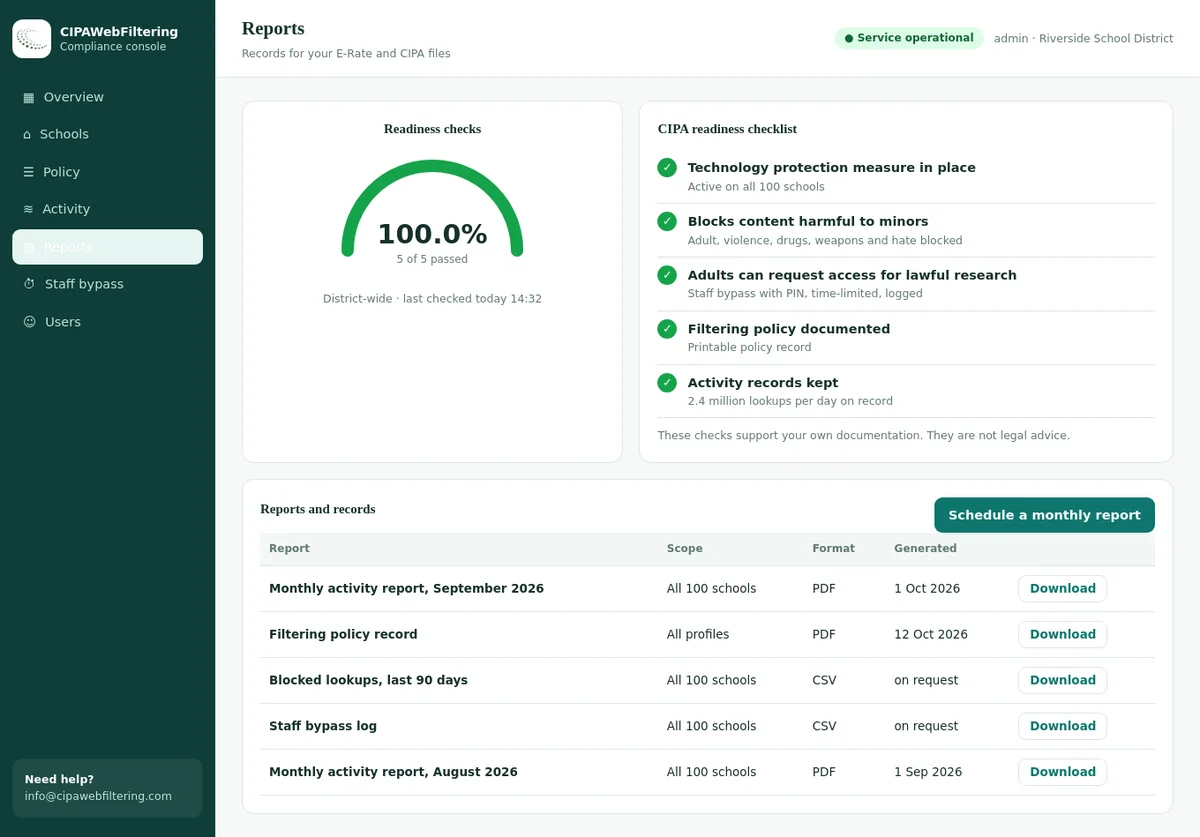
Schedule the district roll-up: category-level reports per building each month, a district summary each term, and an annual package aligned to E-Rate certification. When reporting is a calendar entry instead of a scramble, compliance stops consuming spring break.

What the district roll-up shows

  • Blocked categories, per building and district-wide
  • Exception log: who allowed what, where, and when
  • Coverage confirmation for on-campus and take-home devices
  • Term-over-term trends for board and cabinet review
One filter, one report format, every campus — the difference between an afternoon of preparation and a month of it.

One certification, one body of evidence

Districts receiving E-Rate discounts certify that they enforce a technology protection measure blocking obscene material, child sexual abuse material and content harmful to minors, alongside an internet safety policy, monitoring of minors' online activity, and education on appropriate online behavior. The certification covers the district — which means the evidence has to as well.

When every building runs on the same categorized filter, that evidence assembles itself. The required categories are blocked by the district floor, so demonstrating enforcement is a report, not an investigation. Exceptions are logged with names and dates, so the audit trail survives staff turnover. And because the same reports exist for every campus, no single school's configuration can quietly undermine the district's certification.

Auditors and boards respond to consistency. A district that can show the same enforcement story in building twelve as in building one has answered the hard question before it is asked.

The structural choice

One district standard vs. every school for itself

Some districts inherit a patchwork — each campus chose a filter years ago and nobody has reconciled them since. Here is what that patchwork costs against a single standard.

At district scaleDistrict-wide standard filterEach school picks its own
Policy consistencyOne floor, enforced everywhere by inheritanceDiverges by campus; nobody knows the real policy
CIPA / E-Rate reportingOne format, per-building detail, district roll-upManual reconciliation across unlike systems
Handling exceptionsDelegated, scoped, loggedLocal and invisible — or centralized and slow
Contracts & costOne vendor, one renewal, district pricingOverlapping licenses and staggered renewals
Central staff workloadManage one policy and its layersLearn and babysit several consoles
Audit preparationStanding reports, always currentAnnual evidence hunt across buildings
AI governance

Deciding AI policy once, for every school

Generative AI is the fastest-moving category a district has ever had to govern — and it is exactly the kind of question that should not be answered differently in every building.

AI tools are now a district policy question. Our bundled AI Tools Blocklist tracks 16,328+ AI-tool domains across 18 categories and 165+ subcategories, updated daily from a screen of roughly 300,000 newly registered domains per day — so the district decides its AI stance once, and the list keeps up with the launches.

Academic integrity threats

Essay writers and homework solvers raise academic-integrity concerns. Deepfake and face-swap tools (200+ tracked), voice cloning tools (250+), and AI companion chat services (470+) raise student-safety concerns that deserve a deliberate, district-level answer.

Category structure makes it expressible

A district can permit approved AI tools for high school coursework while blocking essay mills for everyone, keep companion-chat and deepfake categories closed across all grade bands, and revisit the lines each term as instruction evolves. It's one more layer on the same district policy.

The privacy dimension

Students pasting personal information into ungoverned AI tools is a data-protection problem, and unmanaged AI use is increasingly a question auditors ask about. Our guide to choosing a school web filter covers how to weigh AI coverage alongside the rest of your requirements.

The physical layer

Filtering a district that is really several networks

On paper a district is one organization. On the wire it is a collection of buildings with different connections, different equipment ages, and different local quirks. District filtering has to be indifferent to all of it.

Mixed connectivity

Some campuses sit on district fiber, others on their own ISP link, and an annex might ride a point-to-point bridge. Because policy is resolved per user and device rather than per circuit, every path to the internet lands on the same rules.

Encrypted traffic everywhere

Nearly everything students visit is HTTPS. Domain-level categorization keeps filtering decisions accurate on encrypted traffic in every building, without depending on each campus running identical inspection hardware.

Guest and event networks

Board meetings, parent nights and gym tournaments put unmanaged devices on school Wi-Fi. Guest segments can carry their own appropriate policy, separate from student and staff rules, without a separate product.

Questions

What district technology directors ask us

Yes — deliberately, not accidentally. Every school inherits the district floor, and grade-band or building-level layers open or restrict categories within it. The elementary campus and the career-tech center can have very different internet experiences while the CIPA-relevant blocks remain identical everywhere, and every difference is visible from the central console.
Policy attaches to the managed device and its user group, not to your network, so a district-issued Chromebook is filtered on a home connection the same way it is in the library. Rollout is a fleet configuration pushed through your device management, which makes ten thousand devices roughly the same project as one hundred.
Evidence that the certification reflects reality: an adopted internet safety policy, a filter demonstrably blocking obscene material, child sexual abuse material and content harmful to minors, and records showing enforcement across the district. Category-level reports per building, plus a logged exception history, are exactly that evidence — produced on a schedule rather than reconstructed under deadline.
Yes, within scope. A building administrator can approve a site for their campus or close a local distraction, and the change is logged under their name. What they cannot do is weaken the district floor or affect another building, so delegation speeds up the everyday decisions without putting the certification at risk.
Both run on the same 120M+ domain dataset, so the filtering quality is identical. Most districts choose cloud because it covers take-home devices naturally and adds no hardware to maintain; districts with strict data-locality requirements or existing appliance investments sometimes prefer on-premise. Mixed estates are workable too — the policy model is the same either way.
Layering is the answer. The floor blocks only what must never be reachable; grade bands open age-appropriate categories from there; buildings handle their local specifics. Because domains carry multiple category labels, mixed sites are judged on all of what they are, and a teacher's unblock request is a scoped exception that takes minutes — not a hole punched district-wide.
No. CIPA requires blocking obscene material, child sexual abuse material and content harmful to minors — it does not mandate blocking social media outright. Whether and where social platforms are open is a district judgment call, and category layering lets you make it differently per grade band: closed for elementary, structured access for high school, whatever your board and community decide.
Typically a pilot building runs the new filter in parallel while you translate existing rules into category policy — most hand-built blocklists collapse into a handful of category selections plus a short exception list. Once the pilot is clean, remaining buildings cut over in groups. Districts usually complete the move inside a term, and pricing is structured so evaluation does not require a commitment.

Bring every building under one policy

Walk us through your district map — buildings, grade bands, device fleet — and we will show you the policy layers, the delegated admin model, and the reports your auditors will see.