More than 300 clients worldwide have trusted the AI services of our company:
Two ways to buy. We run the web filter for you, from $99 a month per site, with Weathervane board reports, AI Controls and App Control as add-ons. Or you license our category data for the filter you already run.
Most schools, districts and libraries choose the hosted filter. The data licence is for organisations that already run their own firewall or DNS filter, and for edtech and filter vendors.
For schools, districts and libraries that want CIPA filtering without running anything
For districts with their own firewall or DNS filter, and for edtech and filter vendors
Please note: the hosted filter is a service. We run the filtering for you; it does not include a copy of the category database. The database is licensed separately.
Every plan starts with the CIPA Filter at $99 a month per site. Add Weathervane reports, AI Controls or App Control with one click and the total updates as you go. Pay yearly and get two months free.
The hosted web filter for one site
Click Add on any tile. The total updates on the right.
A board-ready PDF with your logo every month: what the internet was used for, when, and how it was kept safe.
Decide which AI tools students and patrons can use, see AI use week by week, keep each decision on record and download a report for the board.
Ready app block lists for the iPads and phones you manage, plus the apps' own domains blocked in DNS.
Library laptops, hotspots and supervised take-home iPads (iPadOS 27 or later) stay filtered when they leave your buildings.
Library systems, county libraries, school districts and IT providers: every branch or school gets its own policy, lists and staff PIN, all in one console. Tell us which options you want and we quote each one within one business day. You can start with one or two sites on the monthly plan.
| Sites | Per site a year | Example |
|---|---|---|
| 2 to 9 | $490 to $690 | 5 sites: about $3,000 a year |
| 10 to 19 | $290 to $390 | 15 sites: about $5,000 a year |
| 20 to 49 | $150 to $190 | 34 sites: about $6,000 a year |
| 50 to 99 | $120 to $150 | 75 sites: about $10,000 a year |
| 100 to 199 | $90 to $120 | 150 sites: about $15,000 a year |
| 200 or more | From $75 | Quote |
CIPA Filter, billed yearly for the whole system. Your final price is in the written quote, within one business day.
One router setting, the CIPA preset, the staff PIN at the desk, devices that leave the building, reports for your files and a first site on your own network, step by step with screenshots.
Most school filters stop at website categories. These two add-ons decide which AI tools students and patrons can use, and give your device management ready block lists for apps on managed iPads and phones.
The five AI settings, rules by type, single tools by name and the report of AI tools used at each site, with screenshots.
Presets, app categories, age ratings and AI apps, the block lists for Jamf, Intune and Apple School Manager, and the setup steps, with screenshots.
For districts that run their own firewall or DNS filter, and for filter and edtech vendors. Three databases, each licensed on its own and quoted for your deployment. Ask about the one you need and we reply within one business day.
From $999 · quoted per deployment
Ask about the domains databaseQuoted per deployment
Ask about the AI tools databaseQuoted per deployment
Ask about the apps databaseInternal use, or OEM for products you sell. Group-wide licences are possible. No resale or publication of the raw data.
One-time files, or yearly licences with scheduled refreshes, so new and changed domains reach your filter.
The hosted filter is a service: we run the filtering for you. A copy of any database is a separate licence.
The filter runs on our servers and answers the website lookups of your network. Lookups that lead to a blocked category are stopped before the page loads, on every device that uses the network.
Public PCs, staff computers, tablets and guest Wi-Fi are filtered together, with nothing installed on any of them.
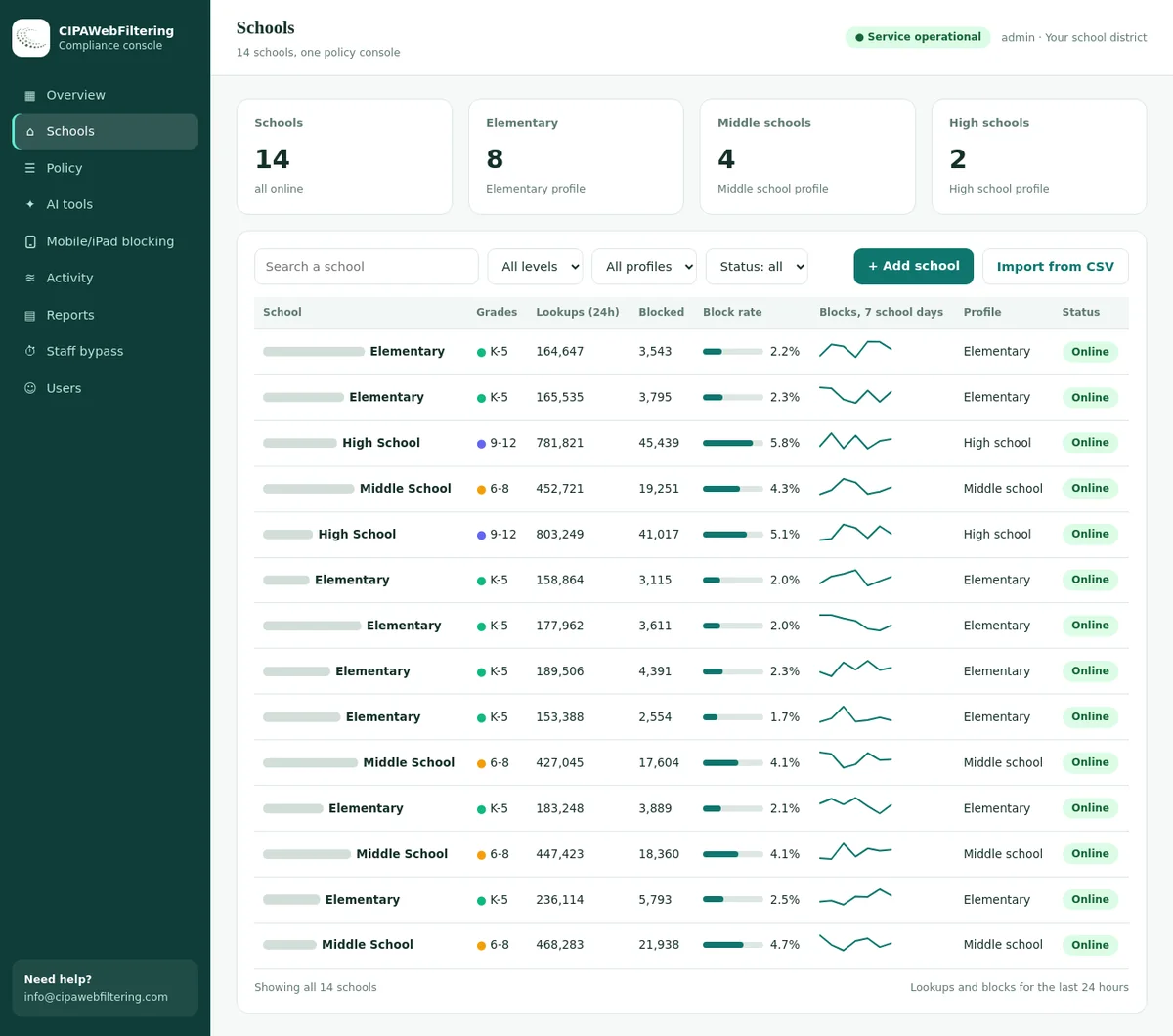
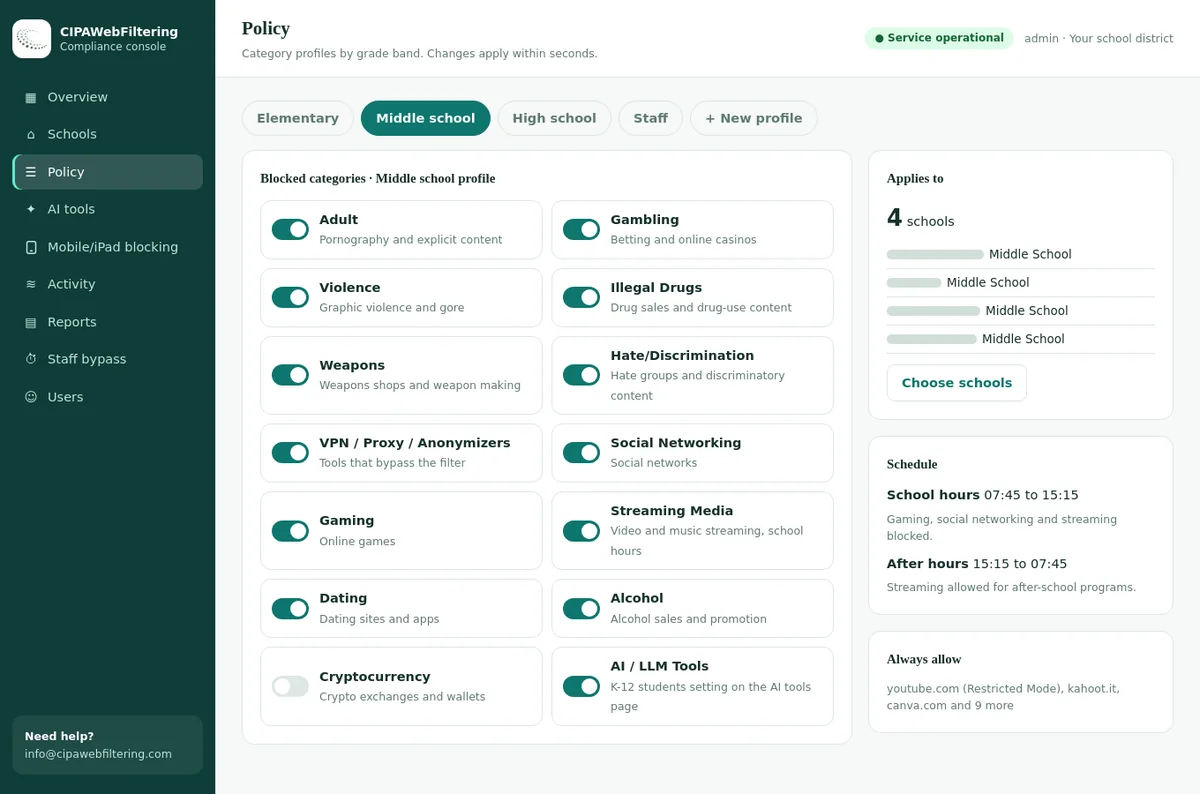
Every school or branch keeps its own categories, always-allow list, always-block list and staff PIN, managed from one dashboard.
An adult needs a blocked site for research: staff enter the PIN, choose 15, 30 or 60 minutes, and the filter switches back on by itself. Every use is logged.
VPN and proxy sites, public encrypted DNS services and browser settings that skip the network filter are blocked by default.
Switch a category or add a site and the rule is live almost at once. Some browsers keep an old answer for about a minute.
The 20 million most visited domains in 58 categories, with about 300,000 new domains categorized every day.
Two filter servers in the United States. If one is down, the other keeps answering with the same rules.
The filter answers only the network addresses and encrypted links registered for your sites. Everyone else is refused.
We help with the router setting, import your old block lists and adjust the rules with you during the first weeks.
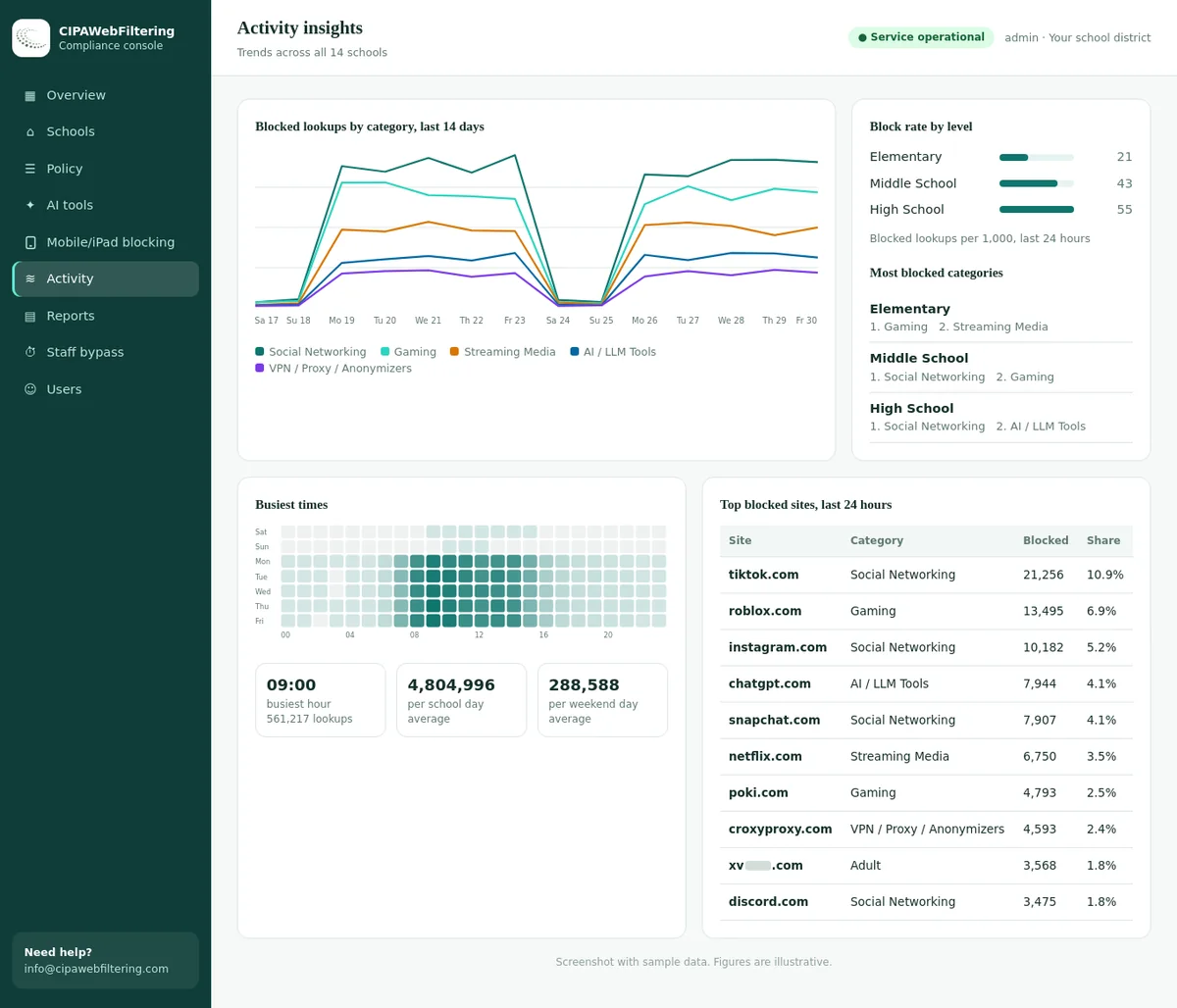
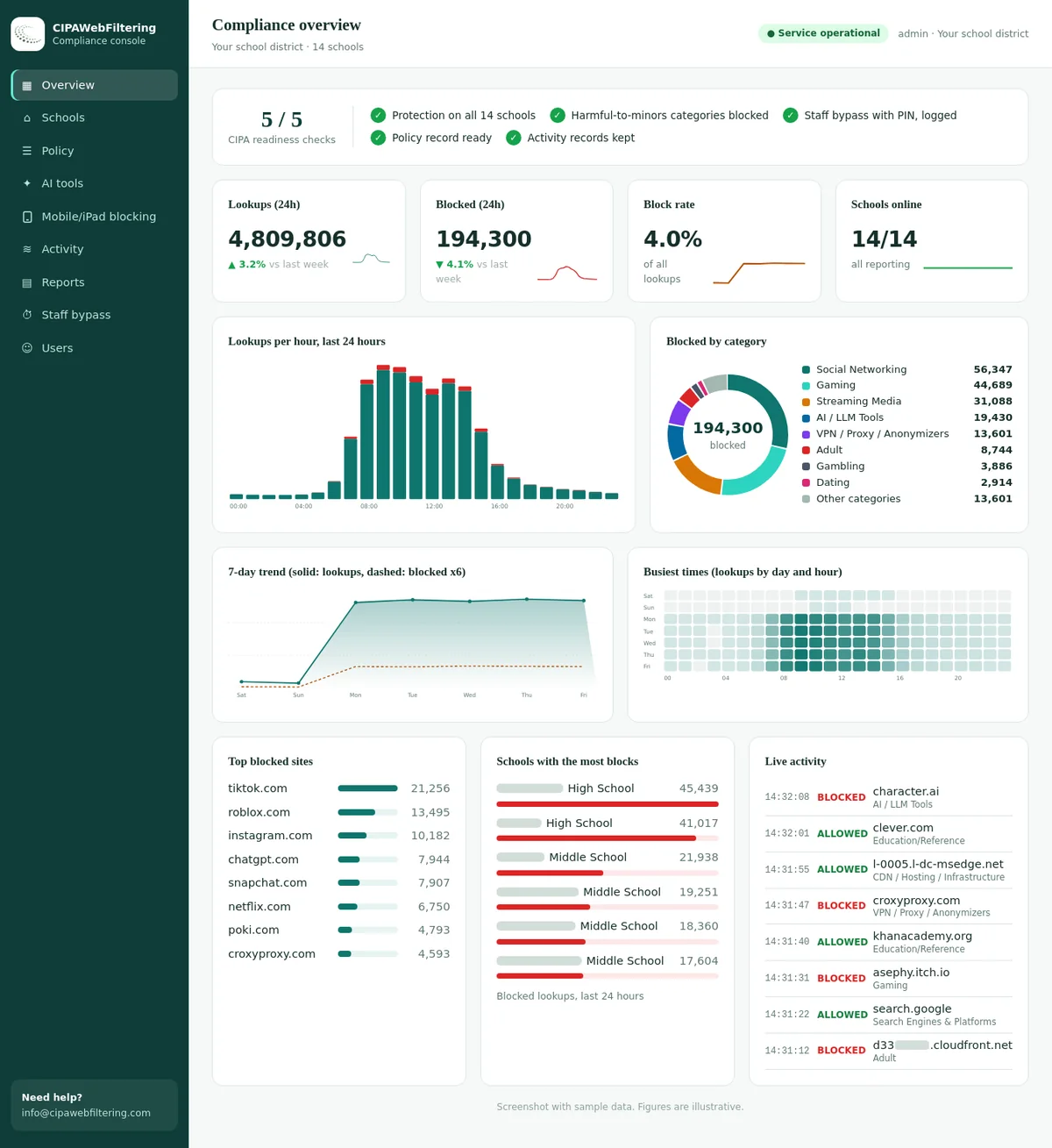
Screens with sample data for a district of 14 schools. Click any screen to see it larger.


Enter the two filter addresses we give you on your router or firewall. Every device on that network is filtered from then on.
Start from the CIPA preset, add categories your policy needs, and add sites that must always open or always stay blocked.
Check activity in the dashboard and print or download reports whenever your files or board need them.
CIPA asks for a technology protection measure against images that are obscene, child pornography or harmful to minors. The preset turns that into a short list of switches, kept narrow so lawful information stays open.
| Category | In the CIPA preset | Why | Staff PIN opens it? |
|---|---|---|---|
| Adult | On | The explicit content the law is aimed at | Yes, for adults, for a set time |
| VPN / Proxy / Anonymizers | On | Stops people from hiding traffic from the filter | No, stays blocked |
| Lingerie / Swimsuits / Intimate Apparel | Optional | Off by default because general retailers carry it too | Yes, together with Adult |
| Gambling, Weapons and others | Optional | Added where a school or children's policy asks for them | No, stays as you set it |
| Your always-block list | Always | Sites you block whatever their category | No |
| Your always-allow list | Always | Sites you keep open; this beats any category | Not needed |
Most libraries and schools leave the internet through one address, so the filter cannot tell computers apart by address. It does not need to. Each set of rules can be reached in one of these ways.
Everything on the network gets the main rules, for example public computers and guest Wi-Fi.
Set the children's area link on the children's PCs once, by browser policy, Windows setting or Apple profile. Those PCs get the stricter rules wherever they are.
If your public Wi-Fi or staff network has its own internet line, register its address and it gets its own rules automatically.
Firewalls that send each internal network to a different encrypted link give every area its own rules with no work per PC.
Staff who only sometimes need a blocked site can simply use the staff PIN instead of separate rules.
Lookups and blocks over time, blocked categories and the most blocked sites, for every site.
Find a domain or a time window and see whether it was allowed or blocked. Download it as a spreadsheet.
A monthly summary and a record of which categories and lists were in force, ready for your compliance folder.
Every PIN use with its time and length, without recording what the adult then read.
What is in place and what is still open on your side, at a glance.
A short monthly activity report sent to the people you choose.
One router setting, the CIPA preset, the staff PIN at the desk, devices that leave the building, reports for your files and a first site on your own network, step by step with screenshots.
One site: subscribe online and pick your add-ons. Several sites: tick the options you want, or "not sure yet", and send the form.
You get a written quote within one business day, with each option priced. One or two sites on the monthly plan can start the same day.
Set one DNS address on each router or firewall. We register your network and filtering starts. Nothing is installed on computers.
Schools and libraries that receive E-Rate discounts must certify CIPA compliance, which includes a filter that blocks obscene images, child pornography and images harmful to minors.
Content filtering is on the list of services E-Rate does not pay for, so most schools and libraries fund it from their general budget.
No per-student or per-device counts, so the budget line stays the same as enrolment and devices change.
Activity reports and a policy record from the dashboard help you document your technology protection measure.
No. The hosted filter is a service: we run the filtering for you and you manage it in the dashboard. The category database is a separate licence for organisations that run their own filter.
No. The hosted filter is priced per site, a school or a library branch, so there is nothing to count or report. Only devices away from the network are priced per device, because each one gets its own private link.
A separate AI setting for each network: ready policies for K-12 students, a children's area and adults, rules for 18 types and more than 160 subtypes, single tools allowed or blocked by name, a switch for tools that train on what users type, and a report of the AI tools used at each site.
Device management for your iPads or phones, such as Jamf, Intune, Apple School Manager or Google Admin. You download a ready block list from the dashboard and upload it there. On iPads, app blocking needs supervised devices. Personal devices on your Wi-Fi are still covered by the network filter.
Yes. Yearly plans cost ten months, so you get two months free: $990 for the filter, $790 for Weathervane reports, $490 for AI Controls, $290 for App Control, or $1,690 for Complete.
Laptops, take-home iPads and hotspots used outside your buildings. Each device gets its own private encrypted link to the filter, so your rules follow it. Take-home iPads need to be supervised and on iPadOS 27 or later to use it at home; older iPads use it on your managed Wi-Fi only. It costs 10 cents per device a month, or $1 per device a year, minimum 25 devices.
Tick the options you want on the quote form, or "not sure yet", and we send a written quote within one business day with each option priced separately.
Start with one site on the monthly plan. It is set up within one business day, your team sees the blocks and reports on your own network, and a monthly plan can be cancelled anytime.
Monthly plans can be cancelled anytime. Yearly plans run for the year you paid for.
One library or school can subscribe online in minutes. For several sites, tick the options you want and get each one quoted within one business day.