CIPA audit evidence checklist
A printable checklist of the records that show CIPA compliance for one E-Rate funding year. Tick each item when the copy is in your folder, and the folder is ready before USAC reviews or audits you.
What is inside the checklist
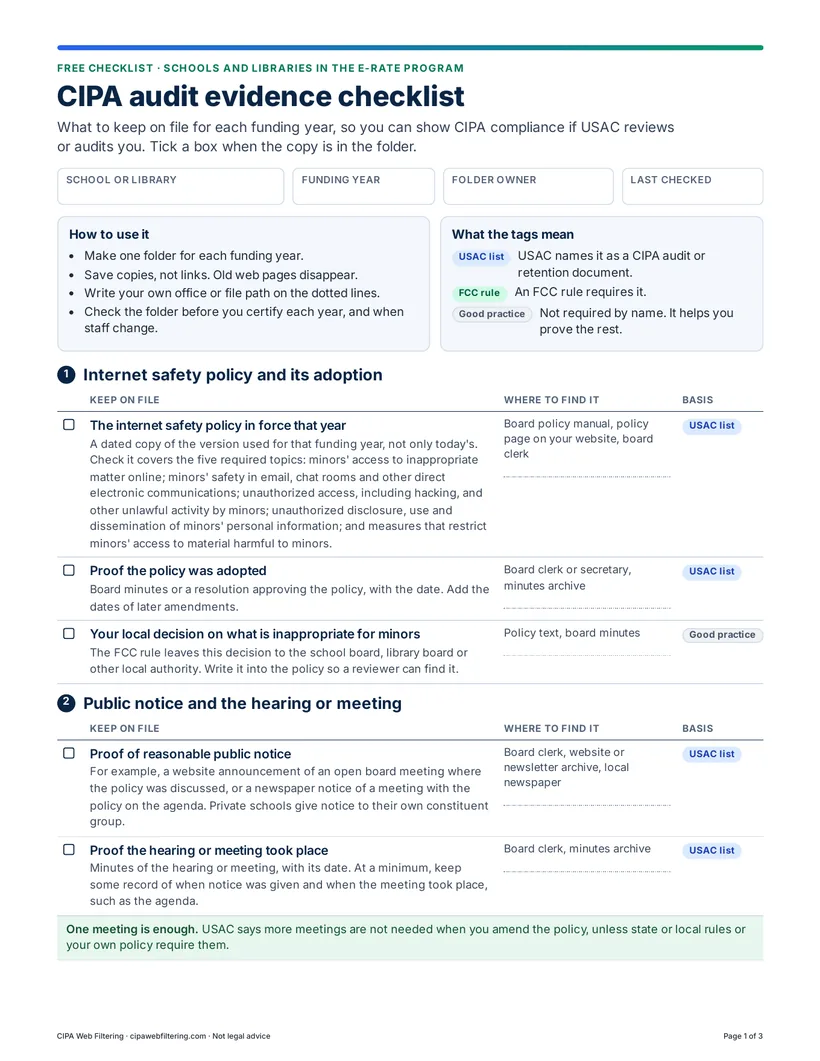
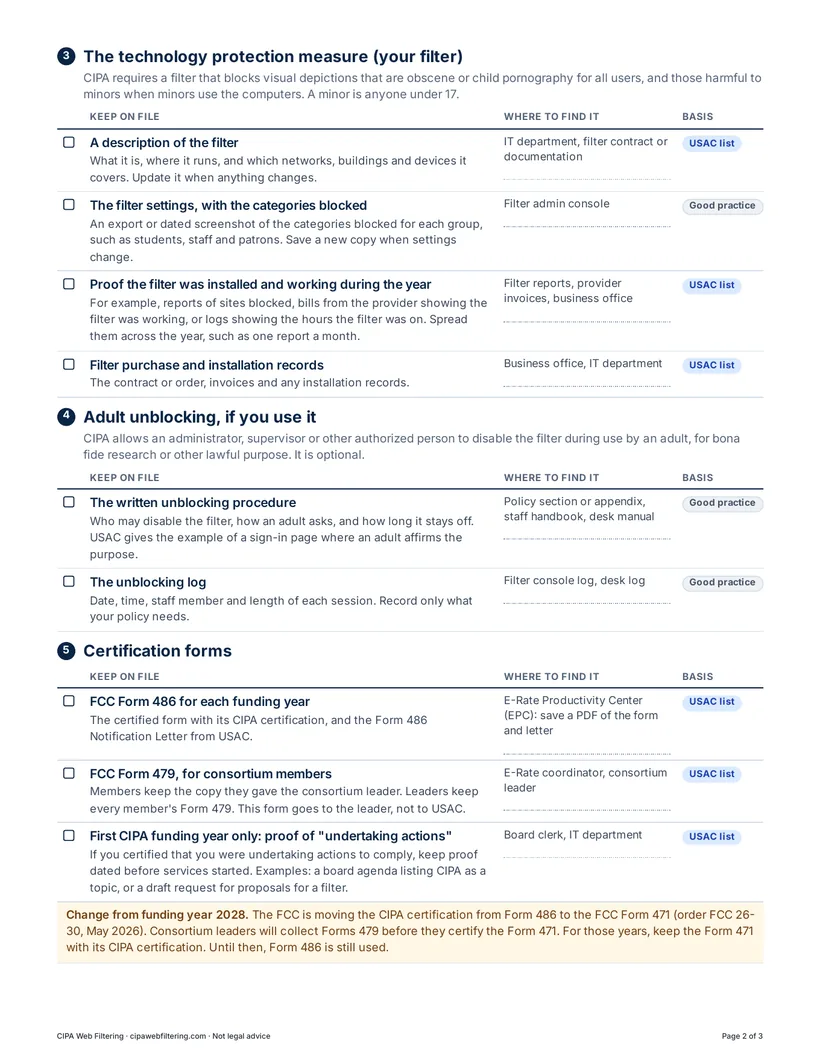
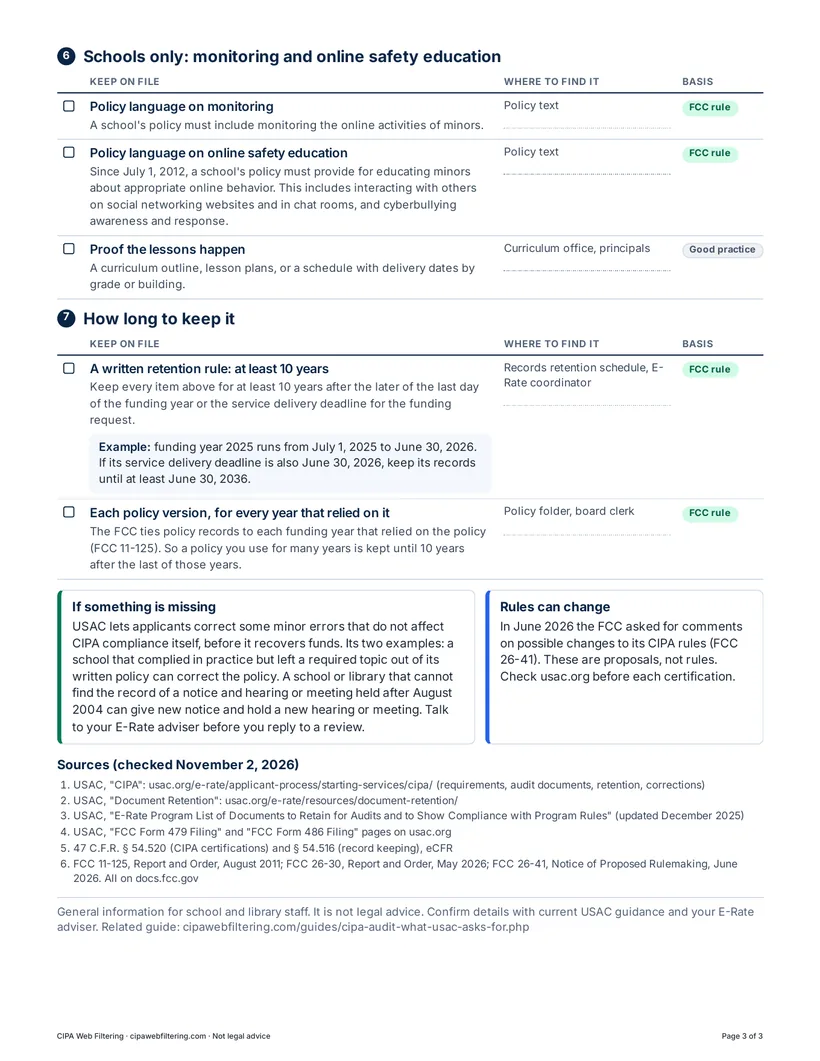
The checklist follows the order a reviewer usually works in: the policy, how it was adopted, the filter, and the forms. Each item has a short description, a dotted line where you write the office or file path, and a tag that shows why it is on the list.
- Internet safety policy and its adoptionThe policy in force that year, proof the board adopted it, and your local decision on what is inappropriate for minors.
- Public notice and the hearing or meetingProof of reasonable public notice and minutes or an agenda from the meeting.
- The technology protection measureA description of the filter, its settings, purchase records and proof it was working during the year.
- Adult unblocking, if you use itThe written procedure and the unblocking log.
- Certification formsForm 486 for each funding year, Form 479 for consortium members, and proof of “undertaking actions” in a first CIPA year.
- Schools only: monitoring and educationPolicy wording on monitoring and online safety education, and proof the lessons happen.
- How long to keep itA written retention rule of at least 10 years, and each policy version for every year that relied on it.
Who it is for
Any public or private school, district or public library that receives E-Rate support and certifies CIPA compliance. In most places the records sit with several people, so the checklist has a line for where each one is kept.
- E-Rate coordinators who make the CIPA certification each funding year and answer USAC.
- Technology directors and IT staff who run the filter and keep its settings and reports.
- Library directors and business managers who hold contracts, invoices and the policy manual.
- Board clerks and secretaries who keep notices, agendas, minutes and the adopted policy.
- Consortium leaders and members who collect or keep copies of the Form 479.
- New staff who take over the E-Rate file and need to know what should be in it.
How to use it
Make one folder for each funding year and save copies, not links. Old web pages and console screens disappear. Then use the checklist at three moments.
For a USAC review or audit
- Open the folder for the funding year USAC asks about.
- Work down the list and tick each record you can produce.
- Items without a tick are your gaps. The box “If something is missing” on page 3 says what USAC lets you correct.
- Talk to your E-Rate adviser before you reply.
When you file the Form 486
- Before you certify, check the folder has the policy in force, proof of the notice and meeting, and a description of the filter.
- After you certify, save a PDF of the Form 486 and the Form 486 Notification Letter.
- From funding year 2028 the certification moves to the Form 471. Keep that form instead for those years.
Before a board meeting
- When the board adopts or amends the policy, use sections 1 and 2 as your checklist for the agenda.
- Give reasonable public notice and put the policy on the agenda as its own item.
- Record the discussion and the vote in the minutes.
- File the notice, agenda, minutes and dated policy in the folder the same week.
No policy yet, or an old one? Start from our free internet safety policy template in Word and PDF. Its last page is an adoption record that matches section 2 of this checklist.
Only CIPA records. E-Rate has other records to keep as well, such as competitive bidding documents. USAC's Document Retention page lists them.
Why each item is there
CIPA asks for three things. A school or library must have an internet safety policy, adopt it after public notice and at least one public hearing or meeting, and use a technology protection measure on every computer with internet access. The filter must block visual depictions that are obscene or child pornography for all users, and those harmful to minors when minors use the computers.
USAC can ask about a funding year long after it ends, and the records must be kept for at least 10 years. People change jobs, websites are rebuilt and filter consoles keep only recent logs. A dated copy in a folder is what still exists when the request arrives. That is why the checklist asks for things like one filter report a month spread across the year, and a copy of the policy version that was in force, not only today's text.
Get the CIPA audit evidence checklist
Three printable pages with tick boxes, a “where to find it” column, the 10-year retention rule and the sources behind each item.
Related guides
- CIPA audit: what USAC asks forThe full guide behind the checklist, with each document explained.
- CIPA internet safety policyWhat the policy must contain and how to adopt it.
- Form 486 CIPA certificationDeadlines and the certification options.
- FCC Form 479 for consortium membersWho files it and who keeps the copies.
- E-Rate FY2027 CIPA calendarThe dates for the next funding year.
- Adult unblocking in librariesThe law, a procedure and the records to keep.
Questions about the checklist
Is the CIPA audit checklist free?
Yes. It is a free PDF and there is no sign-up. You can print it and share it with the people in your school, district or library who keep the records.
What does USAC ask for in a CIPA audit?
USAC can ask for the internet safety policy, proof of the public notice and the hearing or meeting, a description of the filter, proof that the filter was in place during the funding year, and your certification forms. The checklist lists each of these with where to find it.
How long do we have to keep CIPA records?
At least 10 years after the later of the last day of the funding year or the service delivery deadline for the funding request. A policy used for several years is kept until 10 years after the last year that relied on it.
Do libraries need section 6?
No. Section 6 covers monitoring and online safety education, which are required of schools only. A public library can skip it and use the rest of the checklist.
Does a CIPA filter on its own pass an audit?
No. A reviewer also looks at the written policy, the public notice and meeting, and your forms. A filter that keeps dated reports makes the item “proof the filter was installed and working” much easier to show.
What changes from funding year 2028?
The FCC is moving the CIPA certification from the FCC Form 486 to the FCC Form 471 (order FCC 26-30, May 2026). For those years you keep the Form 471 with its CIPA certification. Until then the Form 486 is still used. The checklist notes both.
Is the checklist legal advice?
No. It is general information for school and library staff, based on USAC and FCC sources checked on November 2, 2026. Confirm details with current USAC guidance and your E-Rate adviser.
Check where your CIPA file stands
The free CIPA readiness check asks nine short questions about your filter, policy, public meeting, records and CIPA form, and gives you a gap list with next steps. If you would rather we run the filter, our hosted CIPA filter keeps the activity reports and policy record for your folder, from $99 a month per site.
General information for school and library staff, not legal advice. Sources in the checklist were checked on November 2, 2026. More free tools: Free CIPA resources.